Mobile Anti Theft Devices for Retail Stores: Deployment, Operations & ROI Playbook
If you’re trying to rank for mobile anti theft device, you’re in the right place — but let’s be precise about what the term means in retail. In-store, a mobile anti theft device is not a consumer tracker or “find my phone” tool. It’s the hardware + alarm logic + deployment process that lets customers pick up demo phones and tablets while keeping high-value devices inside the store, tables clean, and staff workload predictable.
This playbook is written for chain retailers, electronics malls, and mobile carriers in South America, the Middle East, South-East Asia, North America, and Europe that care about three outcomes:
- Shrink reduction and safer stores
- A premium hands-on experience (customers can try devices naturally)
- Fast rollouts across many locations without chaos, false alarms, or messy fixtures
In other words, this is a practical field manual for rolling out a mobile anti theft device program as part of a broader stack of loss prevention devices and retail anti theft devices — with clear standards, calmer operations, and measurable ROI.
This guide sits inside the bigger retail security display system and it focuses on operations — how to deploy, govern, and measure performance — so you don’t end up with “good hardware” that fails in daily retail reality.
1) Terminology: What “Mobile Anti Theft Device” Means (B2B Retail Definition)
In retail, a mobile anti theft device typically refers to the in-store display security device used on demo units (phones/tablets and often adjacent categories like wearables). A complete mobile anti theft device program usually includes:
- Physical restraint (deterrence + resistance): grippers/clamps, reinforced anchors, anti-cut tethering where needed.
- Alarm / awareness: pull / cut / tamper triggers, escalation patterns, and a plan for “quiet but effective” alerts.
- Operations layer: installation standards, reset routines, inspection cadence, training, spare parts, and exception handling.
In plain terms: a mobile anti theft device is a system, not a gadget.
- anti theft devices for mobile phones (broad category phrasing)
- phone security devices (wide — your copy must “retail-qualify” it)
- anti theft device for electronics (useful vertical tie-in — make it clear you mean consumer electronics retail)
2) Cell Phone Anti Theft Device (Retail Meaning) — Not Personal Anti-Theft Gadgets
Because the keyword is so close to your core phrase, it deserves its own clarification section.
A cell phone anti theft device in retail usually means the display-side security device that:
- allows hands-on trials (lift, tilt, swipe, camera test, accessory try-on)
- prevents walk-off and reduces grab-and-run incidents
- creates visible deterrence without turning your premium table into a wire jungle
- can be deployed consistently across multiple stores with predictable training and maintenance
What it is not:
- a GPS tracker, consumer anti-loss device, “stolen phone recovery” service, or mobile app
- a personal lanyard / strap solution
- a cyber-security or data-protection tool
This distinction matters for SEO because the SERP is crowded with consumer-intent results. Your job is to signal “retail / in-store / display / demo devices” early and repeatedly, without keyword stuffing.
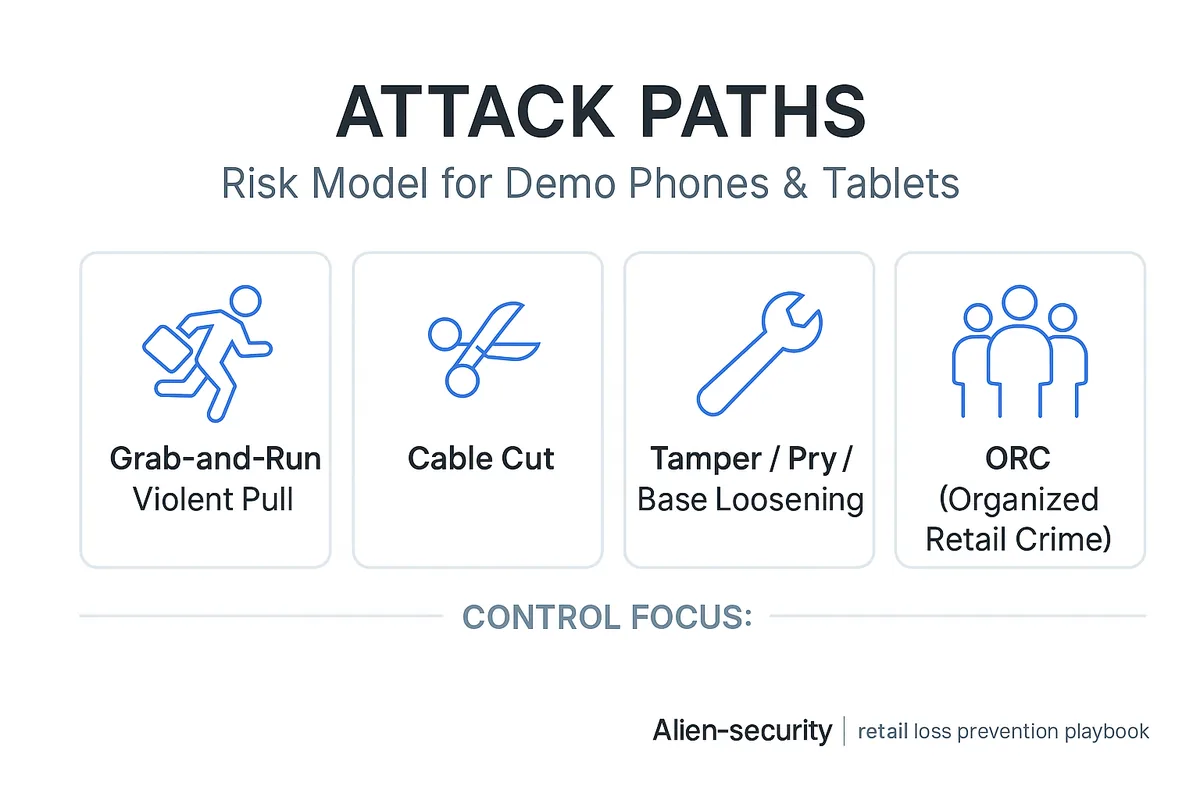
3) Risk Model: The Real Attack Paths (Grab-and-Run, Cable Cut, Tamper, ORC)
Most retail losses happen because teams treat all threats the same. A useful risk model is based on attack paths — how the device actually gets taken.
A) Grab-and-Run / Violent Pull
Fast, physical, and often opportunistic — especially around peak traffic times and high-visibility display tables. The goal is speed, not stealth.
Control focus: visible deterrence + strong mechanical resistance + reliable anchoring + a response routine that doesn’t endanger staff.
B) Cable Cut
Cable cuts are usually quiet and quick. If your store has “alarm fatigue”, this is where losses hide.
Control focus: cut resistance + cut detection + a maintenance workflow so damaged units get replaced before they become an easy target.
C) Tamper / Pry / Base Loosening
Often a “test” before a bigger theft. If bases loosen, tapes peel, or clamps drift out of spec, your system becomes predictable — and criminals notice.
Control focus: inspection cadence, standardized mounting, and clear “remove / repair” thresholds.
D) ORC (Organized Retail Crime)
ORC is coordinated theft intended for resale. It can involve distraction tactics, multiple participants, and quick exits.
Control focus: layered security (not a single device), minimized false alarms, clear staff roles, and analytics-driven hotspot management.
For a policy-level overview of ORC, see the NRF: Organized Retail Crime overview. For research on shoplifting trends and reporting data, see Council on Criminal Justice’s shoplifting reports.
4) Store Zoning: Where Mobile Anti Theft Devices Actually Live
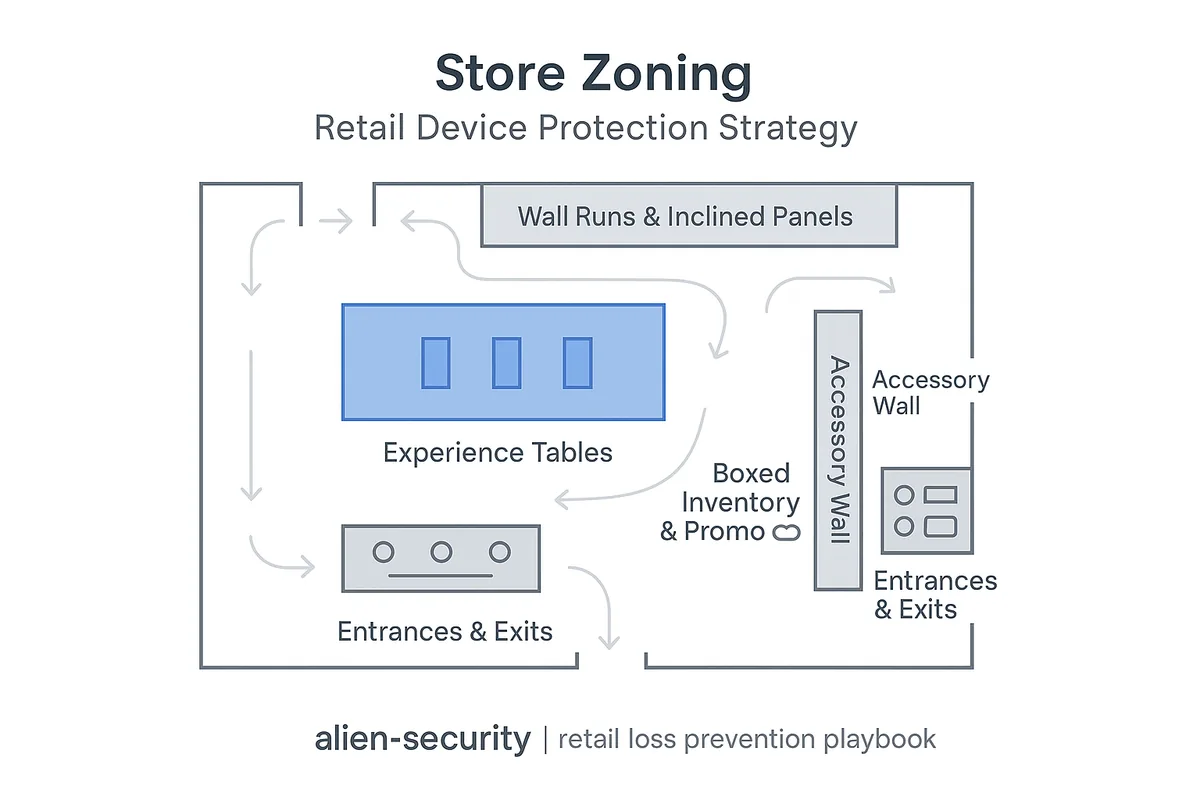
A strong deployment plan maps security controls to zones, not just “products”.
Zone 1: Experience Tables (Premium Demo Tables)
This is where conversion is made — and where grab-and-run risk is highest. Your mobile anti theft device must protect while keeping the experience smooth: lift, test, and return without constant staff intervention.
Zone 2: Wall Runs & Inclined Panels
Long runs demand consistency: same look, same training, same reset behavior. Sloppy cabling or inconsistent angles create a cheap feel and a management burden.
Zone 3: Accessory Walls (High-Volume, High-Traffic)
Accessories are mass-sweep targets. This zone usually needs specialized controls beyond phone / tablet holders.
Zone 4: Boxed Inventory & Promo Stacks (Backstock + Endcaps)
Phones / tablets are often stolen before they hit a table — especially boxed goods on promotion.
Zone 5: Entrances & Exits
Even the best tabletop defense can fail if the outer layer is open. Exit controls reduce the “easy walk-out” scenario and complete the deterrence loop.
5) Layered Controls: The 3-Layer Anti-Theft Architecture (Built for Real Stores)
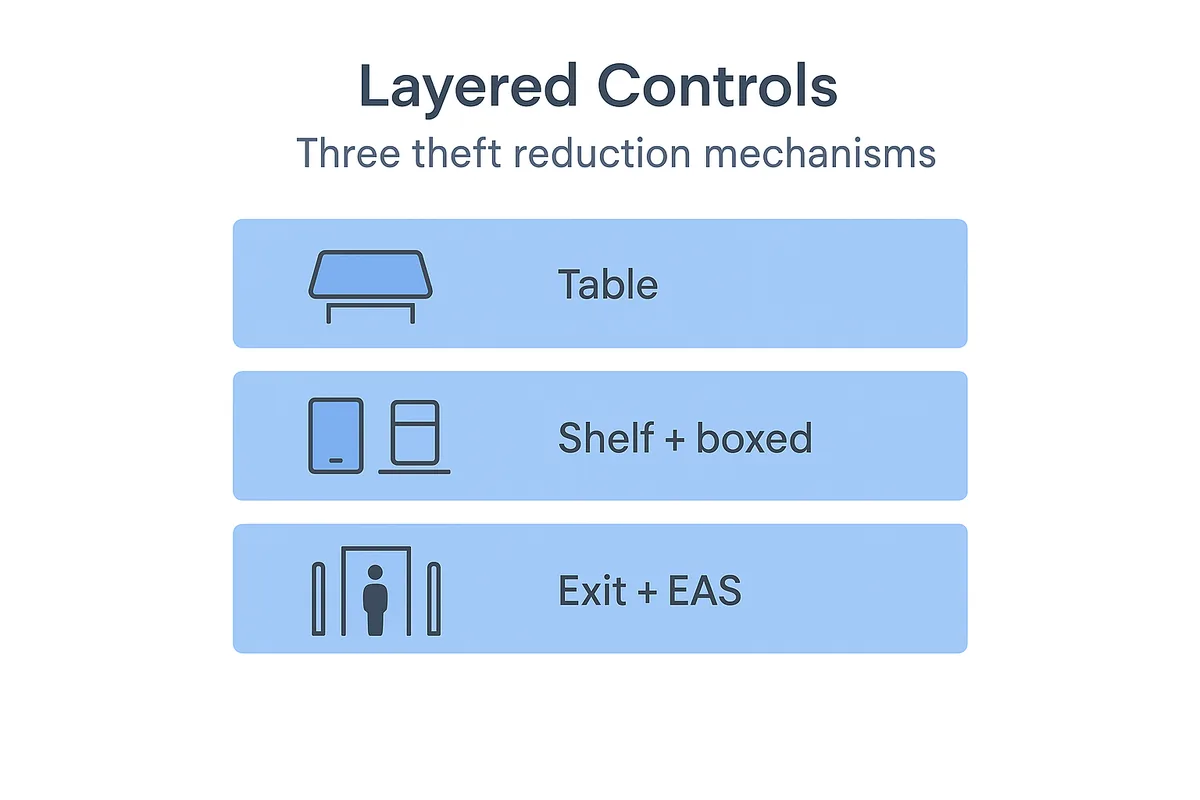
A best-practice program uses layered controls so one failure doesn’t become a loss event. In practice, mobile anti theft devices are only one category of anti shoplifting devices, so top operators combine them with other security devices for retail stores across tables, walls, boxed goods, and exits.
Layer 1 (Inner): Display Table Security
This is where your mobile anti theft device and cell phone anti theft device programs live. The goal: protect demo devices while preserving the premium hands-on experience.
Layer 2 (Middle): Shelf / Wall / Box Controls
- Boxed phones / tablets: spider tags for boxed electronics are a common tactic for promo displays and high-risk boxed items.
- Open-shelf small electronics: safer boxes with magnetic lock help keep products visible while reducing grab-and-run losses.
- Accessory walls: security display hooks reduce sweep theft without destroying merchandising.
Layer 3 (Outer): Exit Controls (EAS)
Exit controls complete the perimeter layer. If you’re building a storewide LP stack, start with your EAS systems and tags at exits.
This layered structure helps you fight both opportunistic theft and ORC patterns without ruining customer experience. For a full-store perspective on how these elements come together in mobile and electronics stores, see our mobile store security solution.
6) Chain Rollout SOP: Pilot 2 Weeks → Acceptance Metrics → Replicate at Scale
Most programs fail because they jump straight to “rollout” without a measurable pilot.
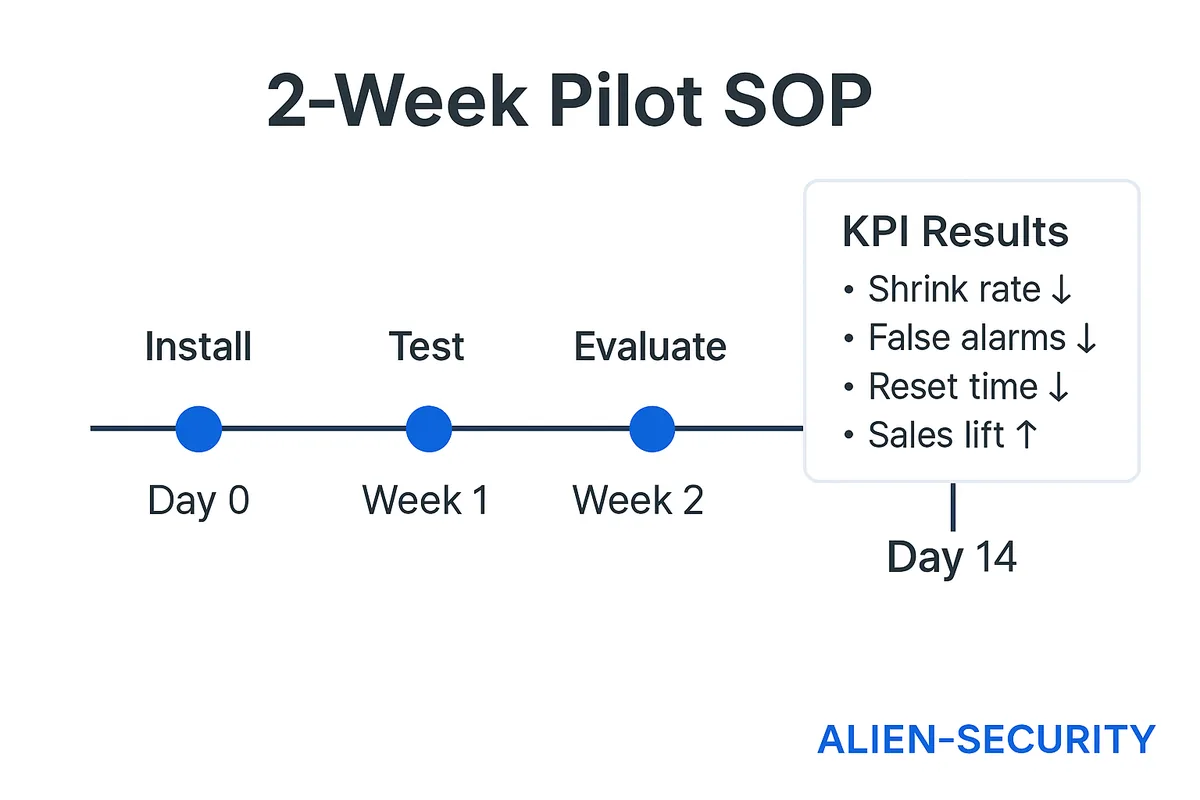
Step 1: Run a 2-Week Pilot (Designed to Be Replicable)
Pick 2–3 sites that represent your reality:
- one flagship / high-traffic store
- one average store
- (optional) one high-risk location
In each store, choose two display areas:
- one premium experience table (highest risk)
- one standard demo table or wall run (operational baseline)
Important: don’t change ten variables at once. Pilot success should be attributable to the system, not to a one-off manager who “cares more”.
Step 2: Acceptance Metrics (Security + Operations + Experience)
Your pilot should measure:
Security
- theft attempts (reported or observed)
- cut / tamper incidents
- “near misses” (loose base, peeled adhesive, damaged cable)
Operations
- daily reset time (minutes per table)
- maintenance time (per week)
- number of store interventions required (how often staff must “fix” the table)
Noise
- false alarms per day
- false-alarm rate (false alarms / total alarms)
- alarm fatigue signals (ignored alarms, delayed response)
Experience
- cleanliness / visual standard (“photo-ready tables”)
- customer interaction quality (do people pick up devices confidently?)
- staff confidence (do they trust the system?)
Step 3: Replicate with Four Deployment Assets
To scale across stores, produce these assets once and reuse them everywhere:
- a simple bill of materials (BOM) template by zone
- mounting & cable-routing guidelines (consistent installs)
- a 10-minute training card (staff onboarding)
- an acceptance checklist (what “done right” means)
Scaling is not luck. It’s packaging.
7) KPI & ROI Model: Turning “Security Spend” Into a Business Case
The reason procurement gets stuck is simple: people argue unit price instead of total impact.
KPI Set (Track These, Even If You Start Simple)
- shrink impact (estimated loss reduction in the demo zone)
- false alarms (per day, per device table)
- reset labor (minutes per day per table)
- maintenance labor (minutes per week per store)
- cleanliness standard (photo-ready tables % of time)
- conversion support proxy (staff feedback + interaction rate)
ROI Skeleton (Simple, CFO-Friendly)
ROI = (Loss avoided + Labor saved + Sales lift proxy) − (Hardware + replacement parts + training time)
You don’t need perfect data to begin — just consistent data. Even a simple week-over-week comparison across the pilot stores can make the business case credible.
For an industry-wide backdrop on shrink and violence pressures, see the NRF National Retail Security Survey 2023.
8) Procurement (RFP) Checklist: 30 Questions That Prevent Bad Rollouts
Use this list to keep comparisons grounded in operations — where real costs live.
Materials & Durability
- What materials are used for the housing and high-wear parts?
- Are parts resistant to heat and repeated cleaning?
- What are the typical failure modes after 6–12 months?
- What spare parts are most frequently needed?
- Are replacement parts stocked regionally, and what’s the lead time?
Mounting & Installation
- What mounting methods are supported (screw, adhesive, or both)?
- Do you provide mounting templates for common fixtures?
- How do you prevent base loosening under heavy interaction?
- What’s the recommended installation SOP for high-risk stores?
- How do you standardize installs across dozens or hundreds of stores?
Alarm Logic & False Alarms
- What triggers exist (pull, cut, tamper), and how are they tuned?
- Do you support alarm escalation (pre-alarm → full alarm)?
- What is your false-alarm reduction guidance for high-traffic stores?
- How do you manage “alarm fatigue” in real operations?
- What is the store process when a unit starts misbehaving?
Customer Experience
- How does your system preserve natural pick-up and testing?
- How do cables and tethers stay visually clean on premium tables?
- How does the system reset after a customer interaction?
- Does it keep devices positioned consistently for the next shopper?
- How do you prevent tables from becoming cluttered over the day?
Rollout & Training
- What training assets do you provide (one-page SOP, quick start guide)?
- How long does a typical staff training session take?
- What are the three most common operator errors, and how do you prevent them?
- What is your recommended store inspection cadence?
Service & Warranty
- What’s the warranty coverage and the claim process?
- What qualifies as misuse vs normal wear?
- Do you offer advance replacements for critical stores?
- What’s your escalation path for recurring failures?
Project Governance
- What pilot success metrics do you recommend tracking?
- What documentation do you provide for chain procurement and multi-region deployment?
9) Where to Choose Specific Models (Without Turning This Guide Into a Catalog)
This guide is intentionally not a model comparison page. Once your store zones and rollout SOP are defined, use the selection hub to choose the right option for each installation type and risk level:
That page is where model selection belongs. This playbook is where deployment success is built.
10) Desktop Flagship Zone Example (One Practical Reference)
For a premium experience table, the baseline requirement is always the same: high security + clean presentation + predictable reset, supported by a repeatable store routine.
If you want a single reference point for a desktop flagship table setup, see:
cell phone anti theft device MAS1008.
Treat this as an example of how a high-security desktop approach can align protection and experience — then scale the method across stores using the rollout SOP above.
Closing: Secure Better, Operate Calmer, Scale Faster
A modern mobile anti theft device strategy is not about making stores louder or more restrictive. It’s about building a program that:
- reduces shrink without hurting experience
- keeps tables clean and consistent
- lowers false alarms and staff burden
- scales across regions with a clear SOP and measurable ROI
If you’re solving ranking and demand together, this is the content architecture that works:
- This playbook earns “device” intent traffic and authority.
- Your selection hub converts intent into the right configuration.
- Your product pages close with specs, photos, and RFQs.
- Your layered ecosystem — from EAS to safer boxes and hooks — removes the gaps criminals exploit.
When you’re ready, start with a two-week pilot, track the metrics above, and turn your rollout into a repeatable system — not a store-by-store improvisation.
Recommended Retail Display Security Devices (By Zone)
Use this quick overview to connect your mobile anti theft device strategy with the right retail security hardware in each store zone.
Table / Flagship Demo – MAS1008
High-security retractable 4-arm phone and tablet display for flagship demo tables and high-risk zones.
View DetailsWall / Inclined Panels – MBS1008
Mobile phone security display stand for wall runs and inclined boards, keeping long display lines consistent and secure.
View DetailsWearables Try-On – WDC1006
Smart watch security display stand with internal recoiler, ideal for secure try-on zones in premium tables and wall sections.
View DetailsLaptops – S-LOCK / V-LOCK
Metal laptop anti theft locks for open notebook displays, balancing high security with a clean, professional presentation.
View DetailsBoxed Electronics – Spider Tags
Spider wire alarm anti-theft devices for boxed smartphones and tablets on promo stacks and high-risk displays.
View DetailsOpen-Shelf Small Electronics – Safer Boxes
Safer boxes with magnetic lock to protect small high-value electronics on open shelves while keeping products fully visible.
View DetailsAccessories Walls – Hooks & Stop Locks
Security display hooks and stop locks for accessory walls, reducing sweep theft without hurting merchandising.
View DetailsEntrances & Exits – EAS Systems & Tags
EAS systems and tags to secure store entrances and exits, completing the outer layer of your retail anti theft devices stack.
View Details